![Incra_logo.png]](https://support.incragroup.com.au/hs-fs/hubfs/Incra_logo.png?width=150&height=67&name=Incra_logo.png)
- To commence, download the myGovID app to your smartphone. Once this is installed, you can begin to set up your account, beginning with verification of your email address. Use your personal email address, such as a gmail or hotmail address, rather than your business address.
- Once this is completed, you can begin to verify your identity using documents such as your driver's licence, birth certificate, passport or Medicare card. myGovID is secure, so there is no need to worry that your private details will be hacked!
- The next step to be taken is logging in to Relationship Authorisation Manager (RAM), to connect your myGovID account with your business.

You will also need to request your bookkeeper or administrative staff member to set up their own myGovID accounts if you wish to add them to your RAM. Details on how to do this are below:
- Firstly, go ahead and open up your Relationship Authorisation Manager (RAM), and head across to 'View or manage authorisations', then select your business' hyperlink from the dropdown (watch this quick clip for a more detailed explanation).
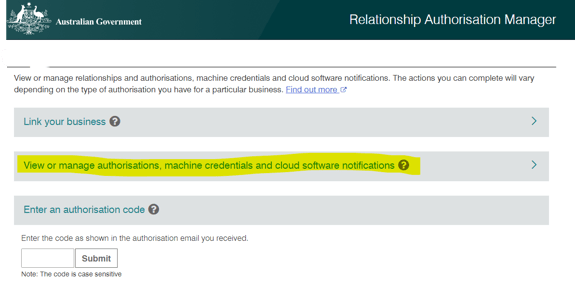
- Select 'Add new user' and enter the colleague's name exactly as it appears in their myGovID app (quick tip: this is likely to be Firstname LASTNAME). A word of caution: do not provide authorisation or machine access to your colleagues unless these are specifically required for the colleague's job role. You can always change this setting later on if it becomes required!
- You will need to allow all services to be included in the authorisation. Once this has been done, simply follow through to the end. You will need to confirm with your colleague that their request email has been received and that they are able to log in.
- Once the RAM set up has been completed, ask your colleague/s to log in to https://bp.ato.gov.au/ and find the link on the menu to 'Activity Statements'. Ensure that your colleagues are able to access and open these statements.
And finally, feel free to contact us at hello@incragroup.com.au with any questions or concerns. We are more than happy to help!
For more on linking your business to RAM, check out our article here.